8  Describing Data

In this chapter, we will apply what we know about describing data to explore three datasets. Descriptive statistics are a set of tools that allow us to summarize a given dataset based on various characteristics.

We will use the following spatial data:

The last two datasets are aggregated summaries rather than raw measurements. The Climate Normals are temporal averages,meaning that the data represent the average conditions over a 30-year period. The ACS data are spatial averages, which summarize individual responses within defined geographic areas. This is a requirement for many spatial datasets, even when individual-level data is available, to maintain anonymity.

As a result, when we analyze these datasets, we are working with information that has already been statistically summarized over time and space, and our own statistical descriptions will be second-order summaries that describe patterns in data that have already been aggregated.

To follow along with this tutorial, download the .Rmd template here. The template already includes a code chunk for loading libraries and reading in the data, along with labeled empty chunks for each section of the tutorial. As you work through the code examples below, add each set of commands to the chunk with the matching section heading in your template.

8.1 Orienting Ourselves to the Datasets

The ‘glimpse()’ function provides a quick overview of the structure and contents of a dataset. It displays the data types of each column and a preview of the data, making it easier to understand the dataset at a glance.

## glimpse at the rurality data
glimpse(rurality)
Rows: 2,672
Columns: 4
$ GEOID           <chr> "37141920300", "37141990100", "37071031600", "37071031…
$ ruca_code       <chr> "Metropolitan high commuting", "Not coded", "Metropoli…
$ nc_rural_center <chr> "Rural", "Rural", "Not Rural", "Not Rural", "Rural", "…
$ geometry        <MULTIPOLYGON [°]> MULTIPOLYGON (((-78.15648 3..., MULTIPOLY…
## glimpse at the climate normals data
glimpse(climate_normals)
Rows: 469,758
Columns: 2
$ summer_temp <dbl> 56.25781, 56.25312, 56.27656, 56.40313, 56.46875, 57.36875…
$ geometry    <POINT [°]> POINT (-124.6875 48.0625), POINT (-124.6875 48.10417…
#glimpse at acs data
glimpse(acs_tract_nc)
Rows: 2,672
Columns: 54
$ STATEFP          <chr> "37", "37", "37", "37", "37", "37", "37", "37", "37",…
$ COUNTYFP         <chr> "031", "031", "031", "031", "031", "031", "031", "119…
$ TRACTCE          <chr> "970402", "970502", "970805", "970903", "970101", "97…
$ GEOID            <chr> "37031970402", "37031970502", "37031970805", "3703197…
$ NAME             <chr> "9704.02", "9705.02", "9708.05", "9709.03", "9701.01"…
$ NAMELSAD         <chr> "Census Tract 9704.02", "Census Tract 9705.02", "Cens…
$ MTFCC            <chr> "G5020", "G5020", "G5020", "G5020", "G5020", "G5020",…
$ FUNCSTAT         <chr> "S", "S", "S", "S", "S", "S", "S", "S", "S", "S", "S"…
$ ALAND            <dbl> 2395384, 6094915, 139248627, 5864308, 28018671, 97430…
$ AWATER           <dbl> 1553995, 4244211, 421209, 30151466, 35773987, 1568180…
$ INTPTLAT         <chr> "+34.7239933", "+34.7517653", "+34.7817392", "+34.701…
$ INTPTLON         <chr> "-076.7087383", "-076.7387561", "-077.0184797", "-076…
$ tract_name       <chr> "Census Tract 9704.02, Carteret County, North Carolin…
$ total_pop        <dbl> 1309, 2177, 1694, 1211, 965, 4244, 2306, 2720, 6076, …
$ median_age       <dbl> 39.3, 56.1, 43.3, 62.1, 48.4, 55.9, 42.3, 28.3, 29.7,…
$ pct_white        <dbl> 64.17, 93.11, 85.36, 85.47, 86.22, 72.64, 72.94, 6.32…
$ pct_black        <dbl> 21.01, 2.30, 0.00, 0.66, 3.21, 17.86, 9.71, 45.96, 30…
$ pct_aian         <dbl> 0.15, 0.00, 0.41, 0.41, 0.00, 2.00, 0.00, 0.00, 0.05,…
$ pct_asian        <dbl> 0.00, 0.00, 1.89, 0.00, 0.00, 0.00, 4.68, 2.90, 1.50,…
$ pct_nhpi         <dbl> 0.00, 0.00, 0.00, 0.00, 0.00, 0.00, 0.17, 1.32, 0.00,…
$ pct_other_race   <dbl> 0.00, 0.00, 0.00, 0.00, 0.00, 1.06, 0.22, 0.00, 0.00,…
$ pct_two_races    <dbl> 12.15, 0.32, 10.68, 12.80, 0.83, 3.79, 8.24, 1.69, 0.…
$ pct_hisp         <dbl> 2.52, 4.27, 1.65, 0.66, 9.74, 2.64, 4.03, 41.80, 63.8…
$ pct_family_hh    <dbl> 39.31, 64.53, 73.30, 64.78, 65.03, 64.45, 62.60, 61.2…
$ married_fam      <dbl> 19.08, 55.75, 55.45, 61.55, 45.08, 55.44, 42.31, 28.3…
$ male_hh          <dbl> 3.71, 0.00, 3.81, 0.48, 9.84, 3.64, 2.88, 9.40, 8.66,…
$ female_hh        <dbl> 16.52, 8.77, 14.03, 2.75, 10.11, 5.37, 17.40, 23.56, …
$ pct_nonfam_hh    <dbl> 60.69, 35.47, 26.70, 35.22, 34.97, 35.55, 37.40, 38.7…
$ nonfam_male_hh   <dbl> 37.00, 16.13, 15.26, 14.22, 18.31, 17.25, 13.37, 13.7…
$ nonfam_fem_hh    <dbl> 23.69, 19.34, 11.44, 21.00, 16.67, 18.30, 24.04, 25.0…
$ av_hh_size       <dbl> 1.64, 2.05, 2.31, 1.96, 2.37, 2.03, 2.21, 3.01, 2.89,…
$ pct_less_hs      <dbl> 17.40, 7.95, 9.49, 0.00, 8.64, 18.64, 6.50, 19.05, 29…
$ pct_hs           <dbl> 52.21, 53.92, 69.15, 41.87, 67.83, 59.63, 61.34, 60.9…
$ pc_bach          <dbl> 30.38, 38.13, 21.36, 58.13, 23.54, 21.73, 32.17, 19.9…
$ pct_unemp        <dbl> 5.67, 0.41, 0.86, 1.47, 1.45, 0.13, 0.95, 5.91, 8.52,…
$ med_hh_inc       <dbl> 45391, 86583, 66548, 96198, 58750, 67195, 63393, 4844…
$ gini_index       <dbl> 0.4094, 0.4039, 0.4377, 0.4689, 0.5036, 0.4248, 0.462…
$ pct_owner        <dbl> 41.87, 87.64, 81.47, 86.11, 81.42, 70.29, 62.98, 25.1…
$ pct_renter       <dbl> 58.13, 12.36, 18.53, 13.89, 18.58, 29.71, 37.02, 74.8…
$ pct_vacant       <dbl> 19.57, 10.09, 18.90, 78.84, 45.29, 14.68, 8.29, 6.22,…
$ med_year_built   <dbl> 1962, 1985, 1997, 1988, 1965, 1994, 1984, 1983, 1986,…
$ pct_gas          <dbl> 18.95, 13.02, 7.36, 13.41, 31.15, 2.30, 3.56, 49.89, …
$ pct_electric     <dbl> 77.21, 85.66, 85.01, 84.81, 53.83, 96.26, 95.67, 49.7…
$ med_house_val    <dbl> 234100, 329900, 208800, 669300, 168500, 262600, 23640…
$ med_rent         <dbl> 781, 1241, 1133, 1489, 1000, 762, 1184, 1355, 1309, 2…
$ pct_pov          <dbl> 26.02, 4.10, 9.63, 4.21, 16.63, 9.50, 18.35, 16.09, 1…
$ pct_drive_work   <dbl> 90.34, 89.37, 87.40, 75.43, 78.46, 85.78, 94.20, 86.3…
$ pct_public_trans <dbl> 0.00, 0.00, 0.00, 0.00, 0.00, 0.00, 0.00, 4.12, 3.60,…
$ bike_walk        <dbl> 3.22, 0.00, 2.95, 0.00, 2.25, 0.00, 1.40, 2.22, 0.00,…
$ pct_wfh          <dbl> 6.44, 7.95, 8.17, 24.57, 8.36, 10.30, 4.12, 5.43, 11.…
$ av_commute       <dbl> 17, 20, 26, 28, 32, 17, 23, 19, 25, 24, 25, 23, 25, 2…
$ pct_no_veh       <dbl> 27.53, 0.57, 0.00, 3.07, 4.92, 2.97, 3.94, 7.52, 7.90…
$ no_health_insur  <dbl> 19.39, 7.21, 15.13, 4.29, 7.85, 16.02, 6.16, 14.72, 4…
$ geometry         <MULTIPOLYGON [°]> MULTIPOLYGON (((-76.74294 3..., MULTIPOL…
8.2 Describing Rurality

Open the rurality table by double clicking in the environment.

Q1. What does each observation (each row) represent? How do you know?

Q2. Look at the ruca_code variable. What level of measurement is this variable? How does that restrict what descriptive statistics we can calculate about the data?

8.2.1 Creating a Basic Table for Descriptive Statistics

The ‘gt’ package in R is a tool to create “presentation-ready” tables.

## create a basic table of descriptive statistics for RUCA codes
rurality |> st_drop_geometry() |> 
  group_by(ruca_code) |>
  summarise(n = n())  |>  gt() 
ruca_code n
Metropolitan core 1436
Metropolitan high commuting 406
Metropolitan low commuting 87
Micropolitan core 218
Micropolitan high commuting 134
Micropolitan low commuting 79
Not coded 12
Rural area 225
Small town core 39
Small town high commuting 20
Small town low commuting 16

Q3. What is the mode of the ruca_code?

8.2.2 Visualizing Descriptive Statistics

Our descriptive statistics table has given us some useful information about our dataset. Visualizing our data can help us understand our descriptive statistics better.

8.2.2.1 Bar Chart

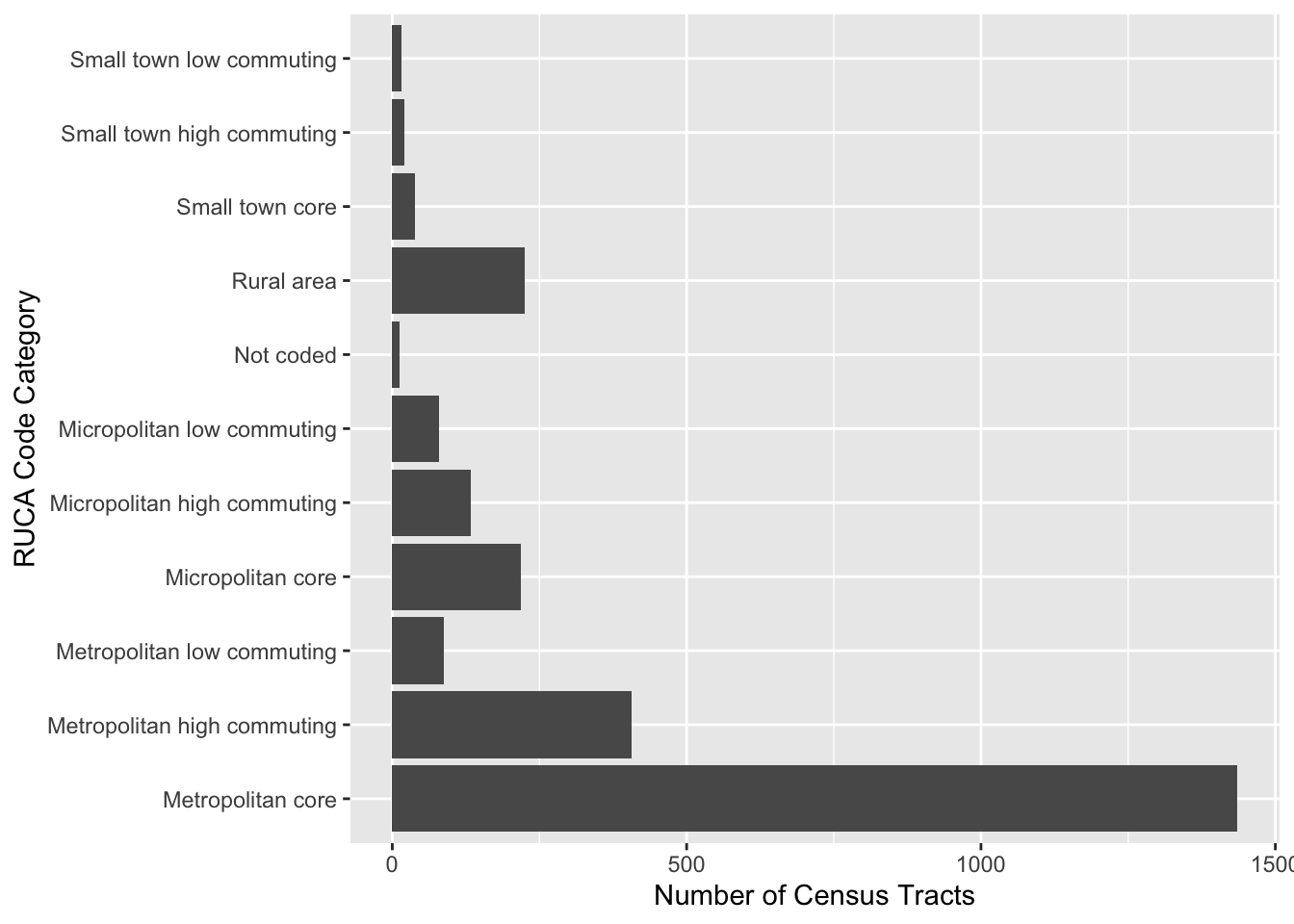
A bar chart displays the count of each observations in a group. It is a useful visualization for nominal/categorical data.

#this creates the grouped dataset
grouped_rural <- rurality |> st_drop_geometry() |> 
  group_by(ruca_code) |>
  summarise(Count = n()) 

#this plots the bar plot (note that the coord_flip swtiches the axis which is better for labeling in this case)
ggplot(grouped_rural, aes(x=ruca_code, y=Count)) + 
  geom_bar(stat = "identity") + coord_flip() + labs(
    x = "RUCA Code Category",
    y = "Number of Census Tracts",
  )

8.2.2.2 Map

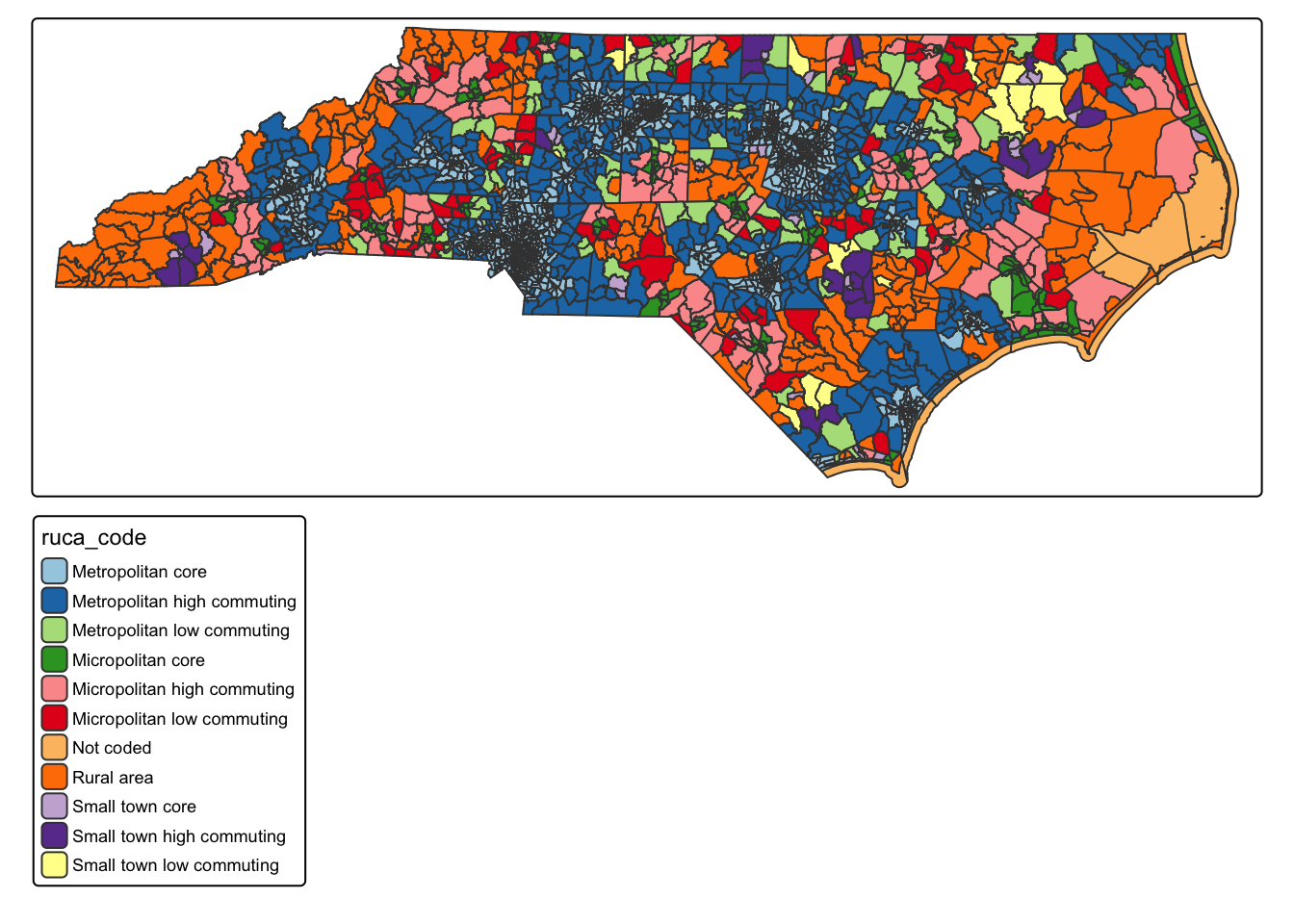
#here's our first map. Note that I'm using the raw data, not the grouped data.
tm_shape(rurality) +
  tm_polygons(fill = "ruca_code", fill.scale = tm_scale_categorical(values = "paired"))

Q4: What spatial patterns can you see in RUCA codes across NC? What does this map tell us that we can’t learn from the descriptive statistics table and non-spatial visualizations?

8.3 Describing Climate Normals

Q5. What does each row in this dataset represent? How do you know?

8.3.1 Creating a Basic Table for Descriptive Statistics

## create a basic table of descriptive statistics for climate normals
climate_normals |> st_drop_geometry() |>
  select(summer_temp) |>
  summarise(
    n = n(),
    num_na = sum(is.na(summer_temp)), 
    mean_temp = mean(summer_temp, na.rm = TRUE),
    median_temp = median(summer_temp, na.rm = TRUE),
    sd_temp = sd(summer_temp, na.rm = TRUE),
    mean_dev = mean(abs(summer_temp - mean(summer_temp, na.rm = TRUE)), na.rm = TRUE),
    min_temp = min(summer_temp, na.rm = TRUE),
    max_temp = max(summer_temp, na.rm = TRUE),
    skewness = skewness(summer_temp, na.rm = TRUE), 
    kurtosis = kurtosis(summer_temp, na.rm = TRUE)
                               
  ) |> pivot_longer(everything(), names_to = "Statistic", values_to = "Value") |>
  gt() |>
  tab_header(
    title = "US Summer Temperatures (1991-2020)",
  ) %>%
  fmt_number(
    columns = everything(),
    decimals = 2
  )
US Summer Temperatures (1991-2020)
Statistic Value
n 469,758.00
num_na 0.00
mean_temp 71.86
median_temp 71.55
sd_temp 7.64
mean_dev 6.26
min_temp 29.91
max_temp 98.04
skewness −0.09
kurtosis −0.25

Q6: Based on the descriptive statistics in the table, describe the overall distribution of summer temperatures across the U.S., including central tendency, variability, and evidence of skewness or outliers. Remember to focus on extracting meaning from the descriptive statistics (not just summarizing results)

8.3.2 Visualizing Descriptive Statistics

8.3.2.1 Histogram

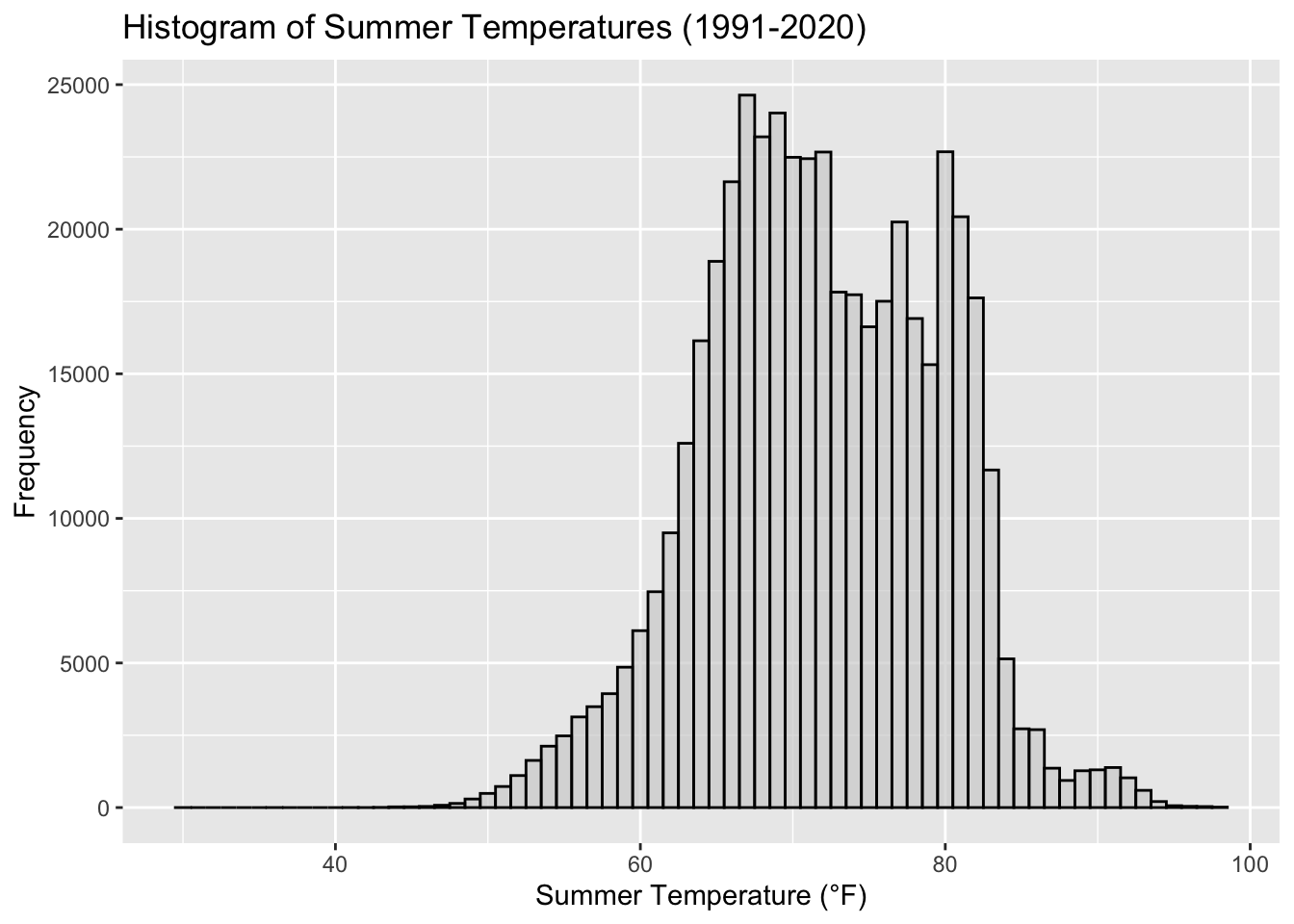
A histogram is a graph that displays the frequency of observations within user-set “bins”. This can give us an understanding of the distribution of our data

## create a histogram of summer temperatures

ggplot(climate_normals, aes(x = summer_temp)) +
  geom_histogram(binwidth = 1, fill = "lightgrey", color = "black", alpha = 0.7) +
  labs(
    title = "Histogram of Summer Temperatures (1991-2020)",
    x = "Summer Temperature (°F)",
    y = "Frequency"
  ) 

8.3.2.2 Cumulative Frequency Plot

ggplot(climate_normals, aes(x = summer_temp)) + stat_ecdf() +
  labs(
    title = "Cumulative Frequency Plot of Summer Temperatures (1991-2020)",
    x = "Summer Temperature (°F)",
    y = "Cumulative Frequency"
  )

8.3.2.3 Boxplot

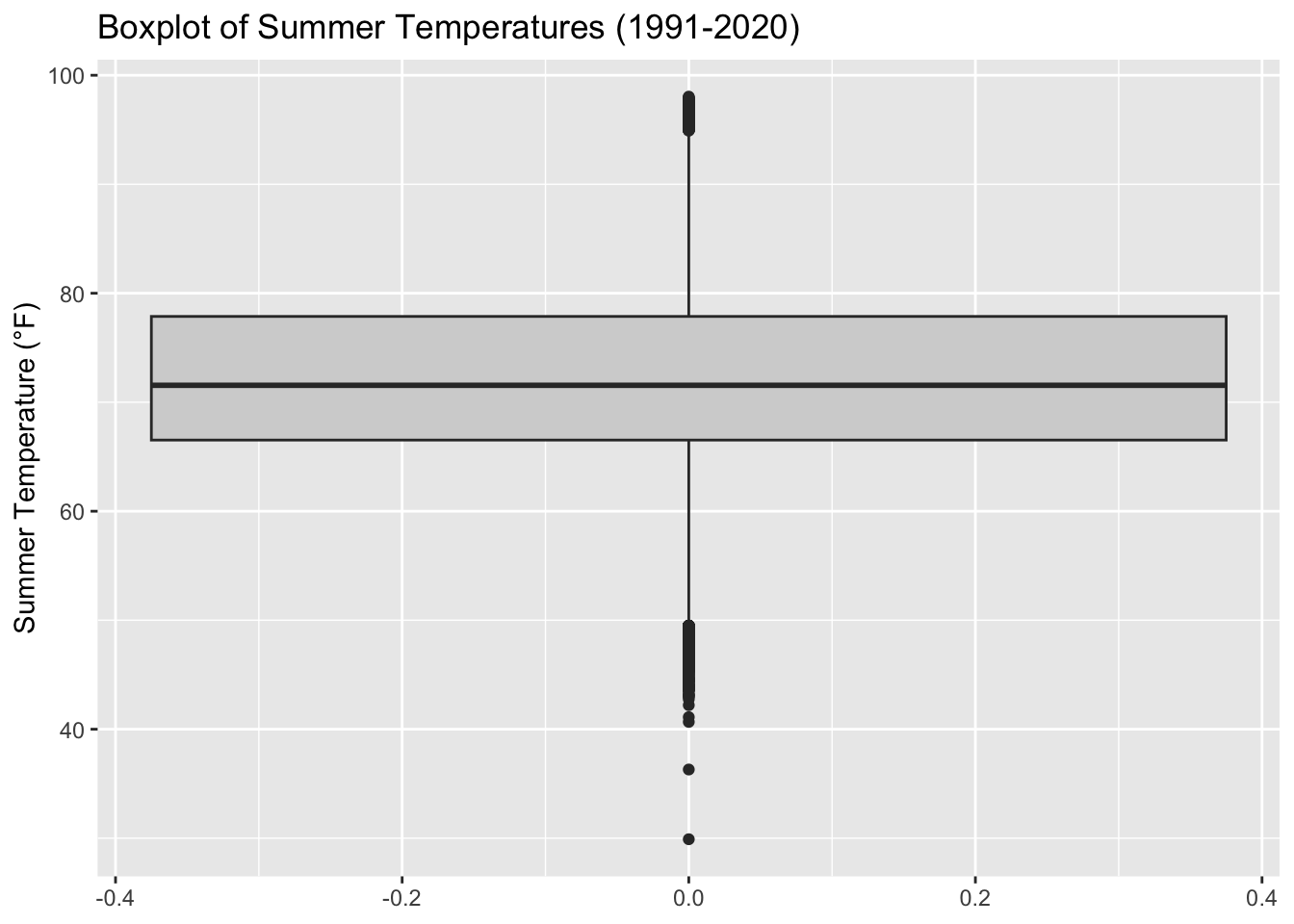
A boxplot is a standardized way of displaying the distribution of data based on a five-number summary: minimum, first quartile (Q1), median, third quartile (Q3), and maximum. It can also highlight outliers in the data.

ggplot(climate_normals, aes(y = summer_temp)) +
  geom_boxplot(fill = "lightgrey") +
  labs(
    title = "Boxplot of Summer Temperatures (1991-2020)",
    y = "Summer Temperature (°F)"
  )

8.3.2.4 Violin Plot

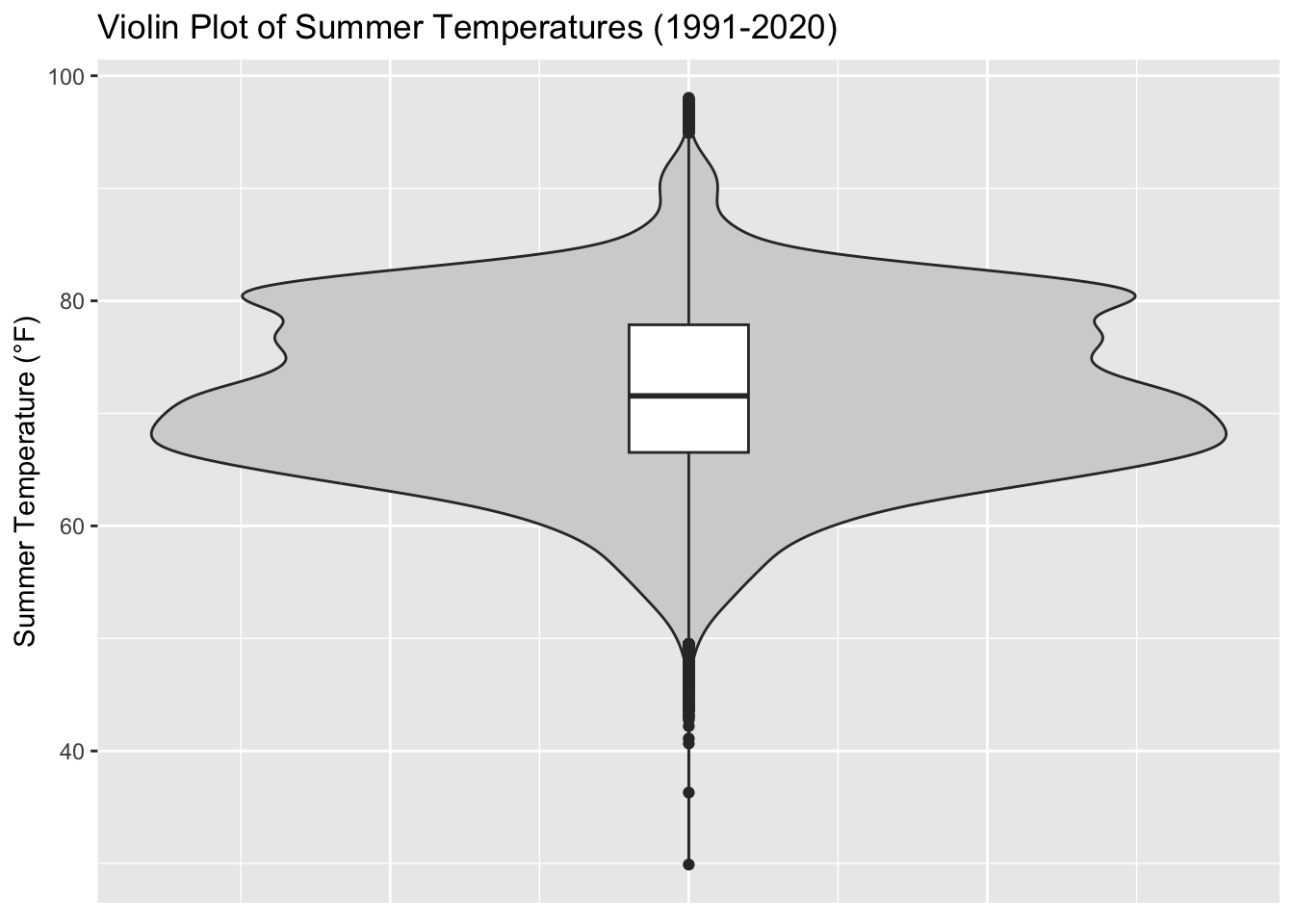
A violin plot is a method of plotting numeric data and can be understood as a combination of a boxplot and a kernel density plot. It shows the distribution of the data across different values.

ggplot(climate_normals, aes(x = 1, y = summer_temp)) +
  geom_violin(fill = "lightgrey", bw = 1.2)  + geom_boxplot(width=0.1) +
  labs(
    title = "Violin Plot of Summer Temperatures (1991-2020)",
    y = "Summer Temperature (°F)"
  ) + theme(axis.title.x=element_blank(),
        axis.text.x=element_blank(),
        axis.ticks.x=element_blank())

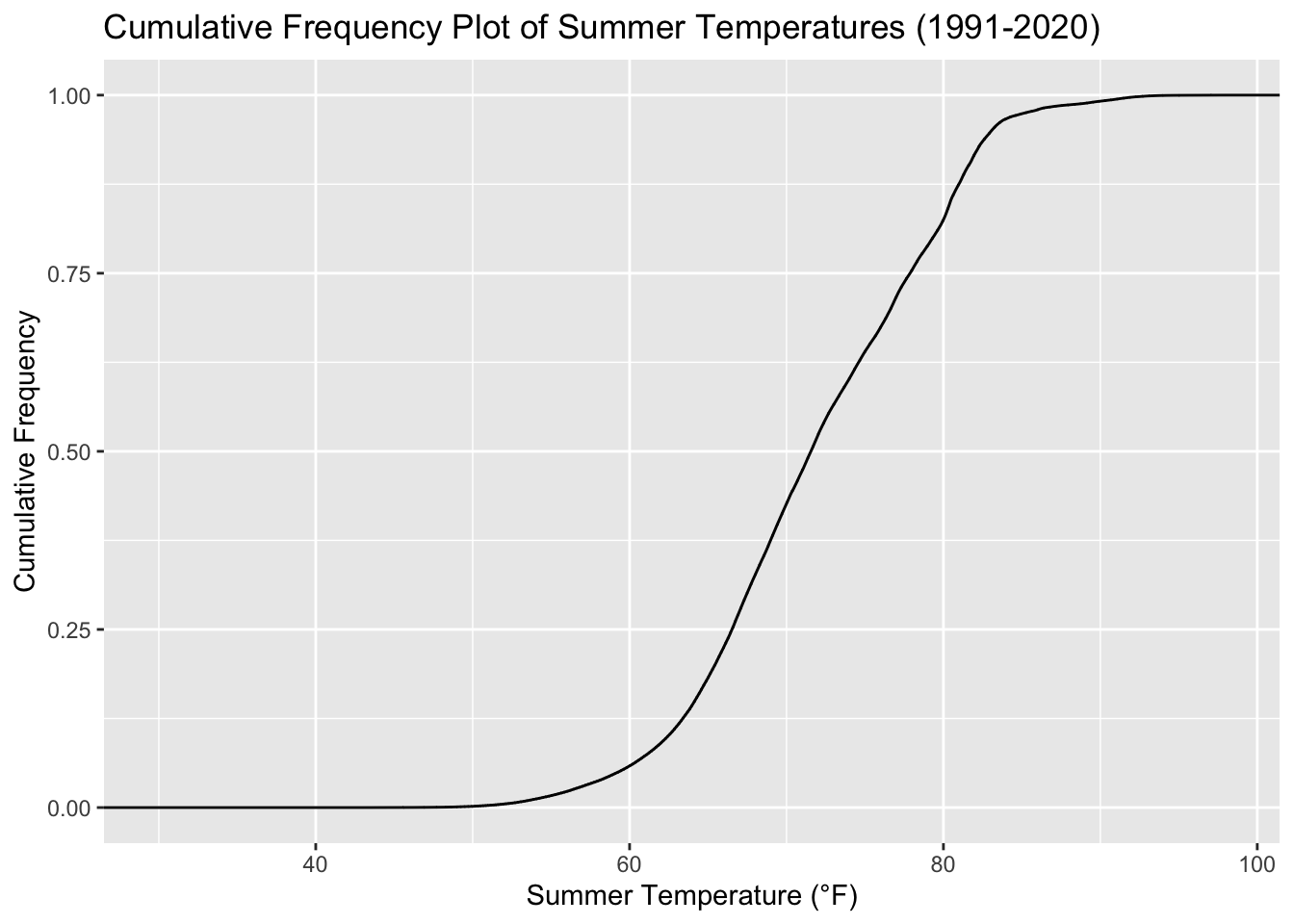
Q7: What unique information does each of the four visualizations (histogram, cumulative frequency plot, boxplot, and violin plot) reveal about the distribution of summer temperatures?

8.3.2.5 Map

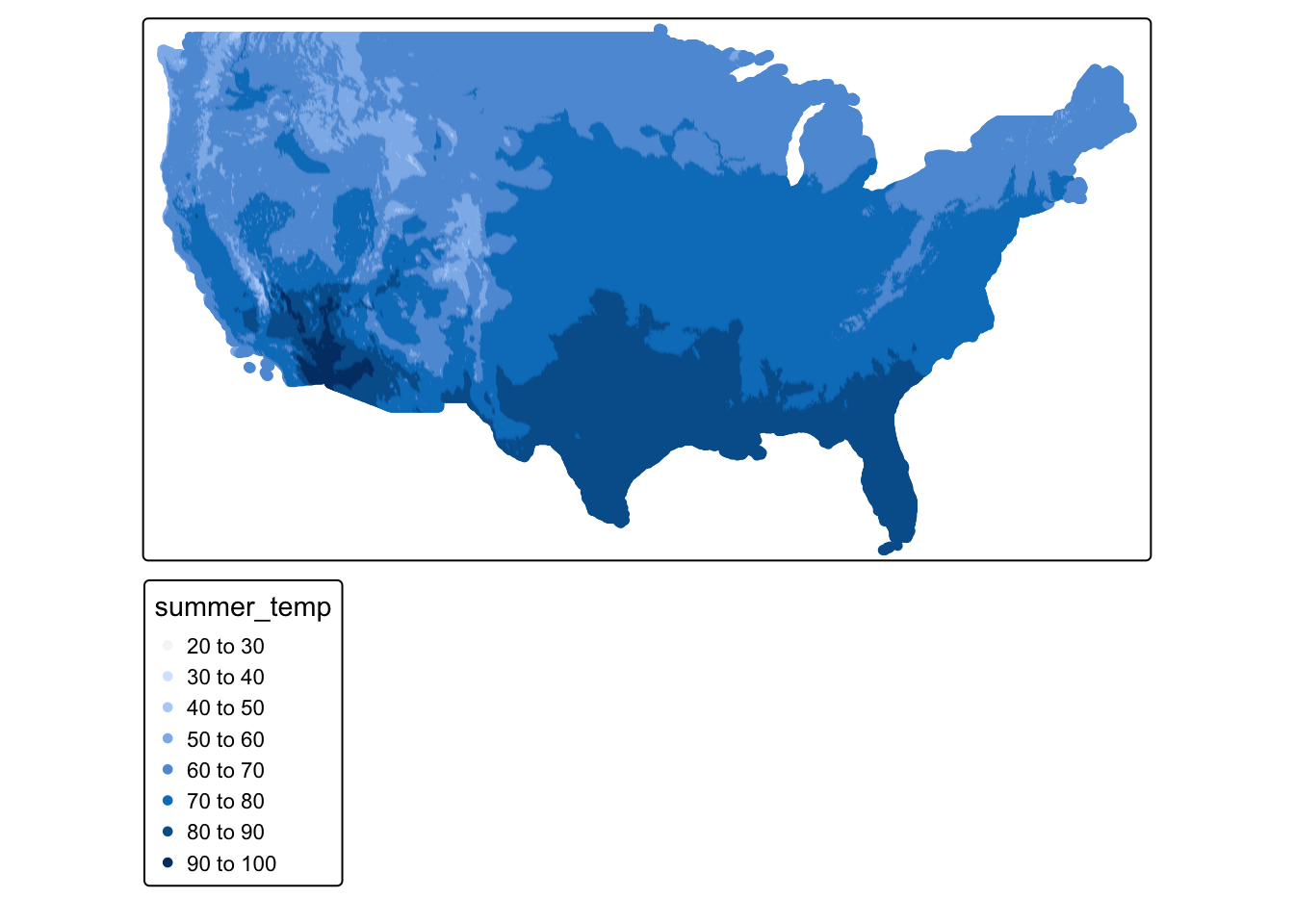
tm_shape(climate_normals) + tm_dots("summer_temp")

Q8: What does this map show us about the pattern of summer temperature across the U.S

8.4 Mini Challenge

This challenge will ask you to create some basic descriptive statistics for a single variable in the ACS census tract data.

  1. Open the acs_tract_nc object. You can scroll over to see all the available variables. This file will tell you what each variable name means.
  2. Select a variable that is interesting to you
  3. Using the code above create a descriptive statistics table in a new code chunk
  4. Using the code above create at least one non-map data visualization
  5. Using the code above create a map of your variable
  6. Answer the following questions:
    • Q9. What did you learn about your variable?
    • Q10. What did you learn about the spatial pattern of your variable?